How to change external monitor brightness on a Mac
A monitor on a Mac often has no brightness slider. The brightness keys change the built-in display, and the external one stays where it was. The usual way out is the monitor's own buttons and its on-screen menu, which is slow when light in the room changes during the day.
I wanted a slider in the menu bar for it, so I built Better Monitor, a free menu bar app for external monitors. It is a notarized download, with no account.
How it changes brightness
Most monitors accept brightness commands over the display cable. The standard is called DDC/CI. Better Monitor sends the command to the monitor and changes its real brightness, the same setting the monitor's own menu changes.
- Download Better Monitor from bettermonitor.pages.dev, open the DMG and move the app to Applications.
- Open it. A monitor icon appears in the menu bar.
- Click the icon and select your external monitor.
- Drag the Brightness slider.
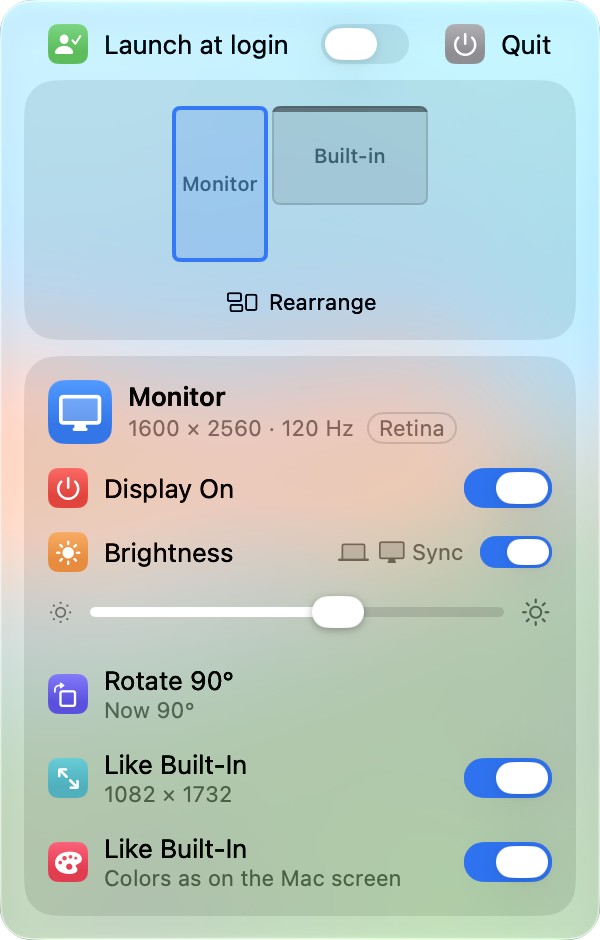
The app needs macOS 15 or later.
Keep both screens at the same brightness
Next to the slider there is a Sync switch. With it on, the external monitor follows the brightness of the built-in display, so two screens in one room stay comfortable when you move a window between them. It is on by default.
At the low end the slider does more than the backlight: below about a third of its travel the monitor's backlight sits at its minimum and the picture is dimmed further in software. If a monitor does not answer DDC at all, the slider falls back to dimming the picture in software, so you still get a darker screen.
If the slider does nothing
- Open the monitor's own menu and check that DDC/CI is switched on.
- Plug the monitor directly into the Mac. Some docks and adapters do not pass DDC commands through.
- Try another cable or another port.
What else the panel does
The same panel has a Retina sharpness switch, which turns on HiDPI modes for monitors where macOS offers none. The Scale section sets the size of the interface, from Larger to More space. There is also a color profile picker for each display. If brightness is all you need, the slider is the whole job.
Better Monitor is free for macOS 15 and later.